Automating lifecycle PRs with GitHub Actions#
GitHub Actions can provide a Dependabot- or Renovate-like workflow. Other CI systems or scheduled hosts can publish the same generated migrations.
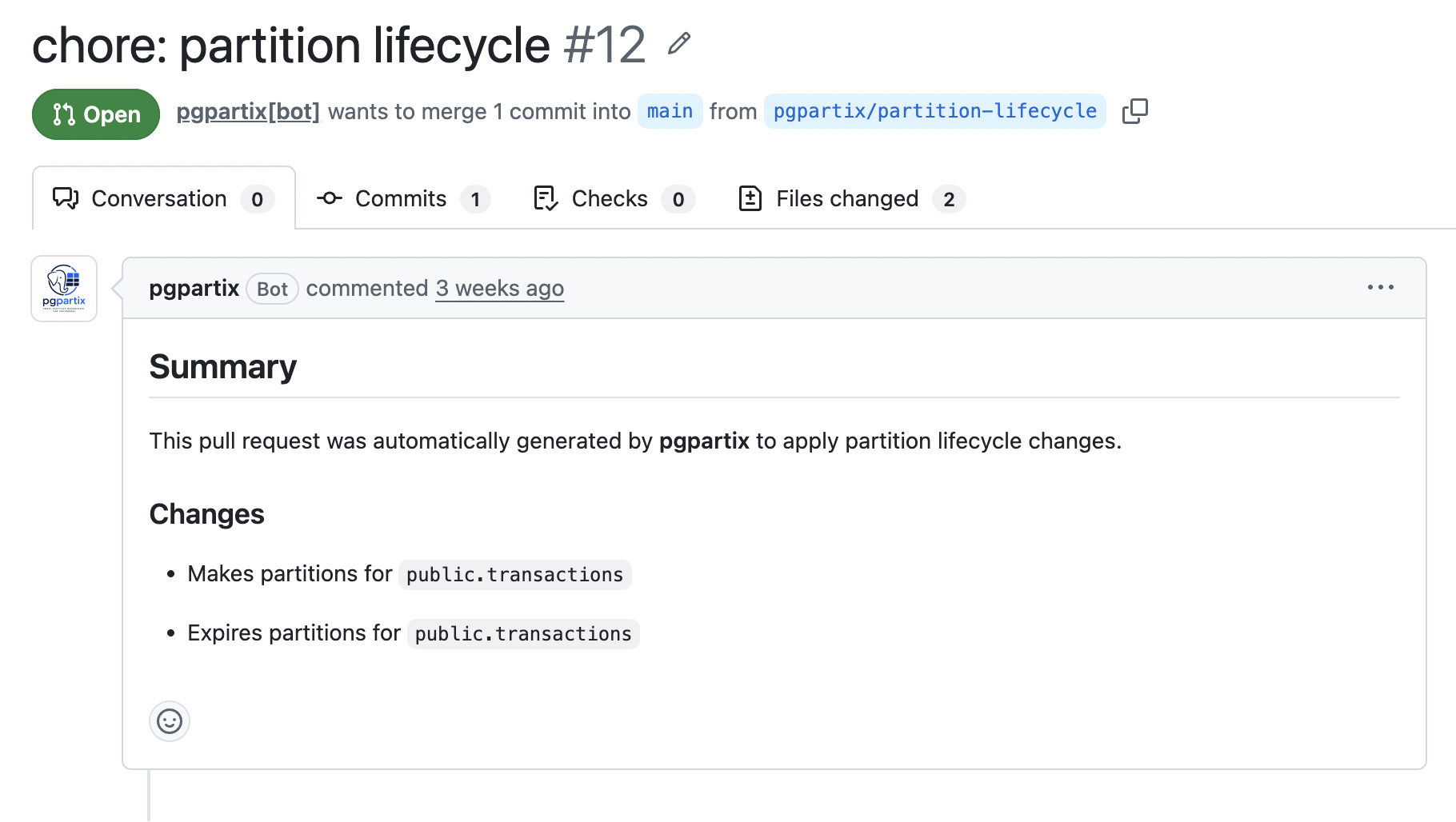
For the GitHub Actions integration:
- A scheduled GitHub Actions workflow inspects the current PostgreSQL schema.
- pgpartix calculates the partitions that should be created or expired.
- It writes ordinary migration files into the application repository.
pgp-gh-create-prcreates or refreshes one dedicated lifecycle pull request.- The repository's normal SQL linting, migration validation, review, approval, and deployment process handles the change.
The workflow creates a reviewable PR; the repository's normal controls decide when to deploy it.
Why the image includes gh#
The pgpartix image includes the GitHub CLI. pgp-gh-create-pr uses git and gh to provide a small reconciliation loop:
- exit without creating a PR when no migration changed;
- create or reset
pgpartix/<branch>from the repository state already checked out in the job; - commit all generated migration changes;
- force-update that dedicated automation branch;
- create a PR when none exists;
- update the existing open PR body on later scheduled runs.
pgp-gh-create-pr is designed to run inside a CI job against a repository actions/checkout has already placed at the correct base branch - it branches from the current HEAD rather than fetching or resetting to a remote ref itself, and it also requires a Git committer identity to already be configured (see PR lifecycle and branch behavior). It is not intended for ad hoc local invocation.
For GitHub users, this avoids requiring a separate PR action with a second configuration model. The same short-lived GitHub App installation token authenticates checkout, branch push, PR lookup, PR creation, and PR updates. Other environments can ignore pgp-gh-create-pr and use their native repository or merge-request tooling.
Running as root#
The container runs as a non-root user by default. When using it as a GitHub Actions job container, set container.options: --user root, as shown in the complete scheduled workflow below. GitHub requires Docker actions and job containers to be run by the default Docker user (root) in order to be able to access the GITHUB_WORKSPACE directory; see USER reference in GitHub's documentation. This requirement is specific to running the container as a job/action - a plain docker run (see Getting started) does not need it.
Recommended authentication: a dedicated GitHub App#
A dedicated App gives partition lifecycle its own visible identity, can be installed only on selected repositories, and can be restricted to the two repository permissions it needs. It also avoids a long-lived personal access token.
Using an App token is operationally important for automation-created changes. GitHub documents that most events created with the repository GITHUB_TOKEN do not start new workflow runs, while a GitHub App installation token can trigger the expected follow-on events. See Triggering a workflow.
1. Register the App#
Create a GitHub App owned by the organization or account that owns the target repository. A name such as Acme Partition lifecycle makes the PR actor easy to recognize.
Recommended registration settings:
- Homepage URL: the repository or internal platform documentation URL.
- Webhooks: disabled; pgpartix does not require inbound events.
- User authorization: not required.
- Repository permissions:
- Contents: Read and write-required for authenticated Git push.
- Pull requests: Read and write-required to list, create, and edit PRs.
- Organization and account permissions: none.
Do not grant Workflows permission unless the configured migration directory intentionally contains .github/workflows files. GitHub recommends selecting the minimum permissions required and documents that HTTP Git access requires the Contents permission in Choosing permissions for a GitHub App.
2. Install the App#
Install the App on the organization or user account, selecting only the repositories where pgpartix should manage lifecycle PRs. Repository selection is an additional boundary on top of the App's declared permissions.
3. Generate a private key#
From the App settings, generate a private key and download the PEM file. Keep the full value, including the BEGIN and END lines. Treat it as a credential and rotate it according to the organization's secret-management policy.
4. Store the App credentials#
In the target repository or organization, create:
| Kind | Name | Value |
|---|---|---|
| Actions variable | PGPARTIX_APP_CLIENT_ID |
The App's Client ID. |
| Actions secret | PGPARTIX_APP_PRIVATE_KEY |
Complete private-key PEM contents. |
The current official token action uses the Client ID, which is distinct from the numeric App ID. GitHub's guide is Making authenticated API requests with a GitHub App in a GitHub Actions workflow.
Complete scheduled workflow#
Create .github/workflows/partition-lifecycle.yaml:
---
name: Partition lifecycle

on:
  workflow_dispatch:
  schedule:
    # GitHub schedules use UTC. Weekdays at 04:30 UTC.
    - cron: "30 4 * * 1-5"

# Do not let two schedules rewrite the same lifecycle branch concurrently.
concurrency:
  group: partition-lifecycle
  cancel-in-progress: false

# The App token performs repository writes. Keep GITHUB_TOKEN read-only.
permissions:
  contents: read
  packages: read

jobs:
  partition-lifecycle:
    runs-on: ubuntu-latest
    timeout-minutes: 30

    container:
      image: ghcr.io/bolajiwahab/pgpartix:latest
      # See "Running as root" above.
      options: --user root

    env:
      PGP_INIT_DIR: initdir

    steps:
      - name: Create partition-lifecycle App token
        id: app-token
        uses: actions/create-github-app-token@v3
        with:
          client-id: ${{ vars.PGPARTIX_APP_CLIENT_ID }}
          private-key: ${{ secrets.PGPARTIX_APP_PRIVATE_KEY }}
          # Omitting owner/repositories scopes the token to this repository.
          permission-contents: write
          permission-pull-requests: write

      - name: Get App User ID
        id: get-user-id
        run: echo "user-id=$(gh api "/users/${{ steps.app-token.outputs.app-slug }}[bot]" --jq .id)" >> "$GITHUB_OUTPUT"
        env:
          GH_TOKEN: ${{ steps.app-token.outputs.token }}

      - name: Check out repository as the App
        uses: actions/checkout@v5
        with:
          token: ${{ steps.app-token.outputs.token }}

      - name: Start PostgreSQL and load the application schema
        id: start
        run: runuser -u pgpuser -- pgp-start

      # A command may publish valid tables and still return 1 for other tables.
      # Preserve that partial progress long enough to open/update the PR.
      - name: Run partition lifecycle
        id: lifecycle
        continue-on-error: true
        run: pgp-run-lifecycle -c partition-lifecycle.yaml

      - name: Create or update partition-lifecycle PR
        if: ${{ always() && steps.start.outcome == 'success' }}
        env:
          GH_TOKEN: ${{ steps.app-token.outputs.token }}
        run: |
          pgp-gh-create-pr \
            -b partition-lifecycle \
            -t "chore: partition lifecycle" \
            -m "chore: partition lifecycle" \
            -n "${{ steps.app-token.outputs.app-slug }}[bot]" \
            -e "${{ steps.get-user-id.outputs.user-id }}+${{ steps.app-token.outputs.app-slug }}[bot]@users.noreply.github.com"

      # Keep the workflow visibly failed when any table failed, even though
      # successful migrations were still proposed in the PR.
      - name: Report generation failure
        if: ${{ always() && steps.lifecycle.outcome == 'failure' }}
        run: |
          echo "One or more partition tables failed generation" >&2
          exit 1
The actions/create-github-app-token action creates a short-lived installation token, masks it, and revokes it when the job completes. actions/checkout stores that token for HTTPS Git operations, while GH_TOKEN lets gh pr use the same App identity.
Pin action references to commit SHAs if that is required by your supply-chain policy. Version tags are used above for readability.
Calling the reusable workflow directly#
The steps above are exactly what .github/workflows/partition-lifecycle.yaml in this repository implements as a reusable workflow. Instead of duplicating them, call it directly from a much smaller caller workflow:
---
name: Partition lifecycle

on:
  workflow_dispatch:
  schedule:
    - cron: "30 4 * * 1-5"

permissions:
  contents: read
  packages: read

jobs:
  partition-lifecycle:
    uses: bolajiwahab/pgpartix/.github/workflows/partition-lifecycle.yaml@main
    with:
      config: partition-lifecycle.yaml
      image: "ghcr.io/bolajiwahab/pgpartix:0.11.0-pg18"
      init_dir: migrations/initdir
      app_client_id: ${{ vars.PGPARTIX_APP_CLIENT_ID }}
    secrets:
      app_private_key: ${{ secrets.PGPARTIX_APP_PRIVATE_KEY }}
Pin @main to a release tag or commit SHA for reproducibility, matching the pinned image. See the inputs/secrets block of partition-lifecycle.yaml for the full list, including the db_* external-database inputs, and branch/title/commit_message for customizing the automation branch and PR.
Why generation uses continue-on-error#
pgpartix handles tables independently. If nine tables generate correctly and one fails, the nine valid outputs are published and the CLI exits 1 with the failed table's PostgreSQL error.
Without continue-on-error, GitHub Actions would stop before pgp-gh-create-pr, throwing away the practical value of that partial result. The workflow therefore:
- records the lifecycle command's outcome;
- creates or updates the PR with every valid migration, from both the make and expire phases;
- ends in a failed state when the generator reported a problem in either phase.
The PR remains useful, while alerts and branch-protection checks still show that operator attention is required.
Loading the schema in CI#
pgpartix needs a PostgreSQL database that represents the schema being maintained. There are two supported operating patterns.
Ephemeral cluster from repository migrations#
The complete workflow above starts PostgreSQL inside the job and applies an initialization directory. pgp-start -i processes supported files in natural order:
- executable or sourceable
.shscripts; .sqlfiles;.sql.gzfiles.
The init directory should build the same parent tables, schemas, tablespaces, functions, and template tables that exist in the target environment. It can invoke the application's existing migration tool from a shell script.
This mode has the smallest security surface because GitHub Actions does not connect to a long-lived database.
External database#
When an authoritative non-production catalog is already available, use the matching PostgreSQL image variant without creating a local cluster, then connect using encrypted Actions secrets:
    env:
      PGP_USER: ${{ secrets.PGPARTIX_DATABASE_USER }}
      PGP_PASSWORD: ${{ secrets.PGPARTIX_DATABASE_PASSWORD }}
      PGP_HOST: ${{ secrets.PGPARTIX_DATABASE_HOST }}
      PGP_PORT: ${{ vars.PGPARTIX_DATABASE_PORT }}
      PGP_DATABASE: ${{ vars.PGPARTIX_DATABASE_NAME }}

    steps:
      # App token and checkout steps omitted here.
      - name: Generate lifecycle migrations
        run: pgp-run-lifecycle -c partition-lifecycle.yaml
Use a read-only database role where practical. pgpartix installs helper functions into the selected database through pgp-setup-infrastructure, so the role must be permitted to create or replace objects in the pgpartix schema.
Protect external credentials with environments, network allowlists, short-lived database authentication, or a self-hosted runner inside the appropriate network boundary.
Scheduling guidance#
GitHub cron expressions are evaluated in UTC and scheduled workflows run from the default branch. Choose a frequency based on the shortest partition interval and desired review time:
| Partition cadence | Typical generation schedule | Suggested future horizon |
|---|---|---|
| Monthly | Weekly or weekday | 2–3 months |
| Weekly | Daily or weekday | 3–6 weeks |
| Daily | Daily | 7–14 days |
| Hourly | Hourly or several times daily | 24–72 hours |
Always leave enough horizon for the PR to pass CI, receive approval, deploy, and recover from a missed schedule before the current partition ends.
Keep workflow_dispatch enabled. It provides a safe manual reconciliation after configuration changes, failed schedules, credential rotation, or emergency horizon extension.
PR lifecycle and branch behavior#
By default:
- the branch is
pgpartix/partition-lifecycle; - the title and commit message are
chore: partition lifecycle; - the repository's remote default branch is used as the PR base;
- a later run force-refreshes the automation branch from whatever base
actions/checkoutplaced the job on (a fresh checkout each run, so effectively the latest base); - an existing open PR from that branch is updated rather than duplicated;
- the PR body lists tables for which make/expire output was produced;
- no Git changes means no commit, push, or PR;
- a Git committer identity must already be configured, either via
-n/-eor by the calling environment — the command exits with an error otherwise.
Customize the branch, PR title, and commit message from within the workflow step:
pgp-gh-create-pr \
  -b database-partitions \
  -t "chore(db): maintain partitions" \
  -m "chore(db): regenerate partition lifecycle migrations" \
  -n "${{ steps.app-token.outputs.app-slug }}[bot]" \
  -e "${{ steps.get-user-id.outputs.user-id }}+${{ steps.app-token.outputs.app-slug }}[bot]@users.noreply.github.com"
The pgpartix/ prefix is added automatically to the supplied branch name.
Because the automation branch is force-updated, do not place human commits on it. Make review changes in configuration and rerun the workflow, preserving the declarative reconciliation model.
Repository governance#
Treat the resulting PR like any other database migration:
- require SQL formatting/linting and migration validation checks;
- execute generated SQL against a disposable database in CI;
- require database-owner review for detach/drop changes;
- use CODEOWNERS for the lifecycle configuration and migration directory;
- block direct pushes to the default branch;
- keep the App installation limited to required repositories;
- audit App-created PRs and token failures separately from human activity.
pgp-gh-create-pr never configures a Git identity on its own; the container has none by default, so pass -n/-e to attribute commits to the GitHub App installation, as shown above (${{ steps.app-token.outputs.app-slug }}[bot]), so the commit author matches the identity GitHub already records for the branch push and PR API activity. Without -n/-e (and no identity otherwise configured in the job), the command exits with an error rather than committing under an unconfigured or unexpected identity. If branch protection requires signed commits, configure that policy before enabling the schedule.
Troubleshooting#
Resource not accessible by integration#
Confirm that the App is installed on the repository and has both Contents and Pull requests read/write permissions. If permissions were added after installation, an organization owner may need to approve the updated installation.
Git push is denied#
Ensure checkout received ${{ steps.app-token.outputs.token }} and did not fall back to github.token. Check branch protection rules that restrict which Apps may push.
gh is not authenticated#
Set GH_TOKEN on the pgp-gh-create-pr step. The GitHub CLI automatically reads this environment variable; see the gh pr create manual.
PR checks do not run#
Verify that the PR was created using the App token rather than GITHUB_TOKEN, and that the repository's CI listens for pull_request activity on the target branch.
No PR is created#
This is expected when no tracked or untracked migration file changed. Review the logs and confirm lifecycle.directory is inside the checked-out repository.
A schedule creates overlapping runs#
Keep the workflow-level concurrency group. It prevents two invocations from racing to force-update the same automation branch.
One table fails but a PR is still created#
This is intentional. Successful table output is publishable, while the final reporting step keeps the workflow failed. Review the failed table message in the job log and the successful migrations in the PR.